
This is an internal documentation. There is a good chance you’re looking for something else. See Disclaimer.
Report-Engine
Setup
Starting with version 3.14 we use Prince for report generation. Our Prince docker images are hosted with VSHN and require basic auth credentials to access.
To create a report, we write Freemarker, which gets transformed to HTML, in our backend. Afterwards, the HTML, together with any used fonts, are sent to our service that runs Prince. The service calls Prince, turning the HTML into a PDF, which then gets streamed back to our backend, where we deliver it to the user.
Credentials
Credentials to access these containers are stored in Bitwarden. Developers must configure these credentials for
local development using the application.properties shown below.
Configuration
The following application.properties are available to configure the Prince pdf generation.
Name |
Default |
Description |
|---|---|---|
nice2.conversion.pdf.reportservice.url |
The url of the report service pod |
|
nice2.conversion.pdf.reportservice.username |
The username used to access prince. See Bitwarden. |
|
nice2.conversion.pdf.reportservice.password |
The password used to access Prince. See Bitwarden. |
|
nice2.conversion.pdf.keepTemporaryFiles |
false |
A property that may be set if you want to keep temporary files. This is very useful for debugging purposes. |
Differences to old engines
Positioning
Setting position: absolute or position: fixed works differently in
Prince than one might expect. Both place an element at a fixed position on the
current page, they do not get repeated. Default positioning (static) works
as in regular websites, Prince just moves elements to new pages when necessary.
Headers and Footers
Headers and footers work differently with PrinceXML. In particular, elements
that should only appear on the first page or only from the second page onward
had to be rethought. In PrinceXML we define our header as a running
element, which means the elements are removed from the DOM during rendering and
then reinserted into the margin boxes. Unfortunately, display: none
does not work in this case to hide elements.
In order to be able to implement the requirement with different elements on the first page versus from the second page onward, we had to restructure the HTML.
Old (WKHTMLTOPDF + Paged.JS / Gotenberg):
<div id="header">
    <div id="tocco_logo">...</div>
    <div id="pagination">...</div>
    ...
</div>
Here a div with the id header was created, and within it a div was inserted
for each header template snippet, with the snippet’s abbreviation as the id. With
WKHTMLTOPDF, the class .first-page or .not-first-page was added to the
header via JavaScript, which then allowed different behavior for the
first page and for the following pages to be defined as follows.
Example styling old (WKHTMLTOPDF):
#header.first-page {
  #tocco_logo {
    svg {
        margin-left: 15mm;
        width: 22mm;
      }
  }

  #pagination {
    display: none;
  }
}

#header.not-first-page {
  #tocco_logo {
    display: none;
  }

  #pagination {
    display: block;
    ...
  }
}
The problem here is that display:none no longer works in headers and footers with PrinceXML.
As a solution approach, we introduced a new configuration option so that it can be
specified whether margin box elements should be displayed on all pages, only on the
first page, or only from the second page onward. From this we then create two
different divs in the Output_template_layout, which are then shown on the first
page or on the following pages. So that rules can still be written for “all” pages,
the classes .header and .footer respectively were introduced.
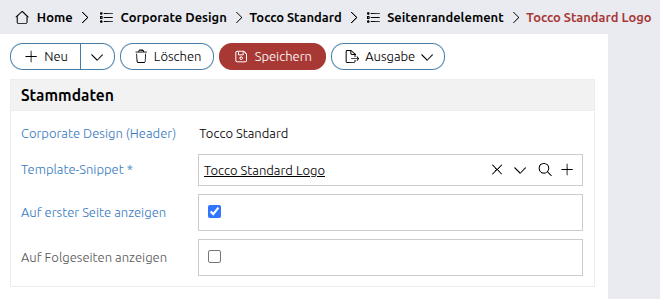
Configuration in the system
If both checkboxes are checked, the element appears on all pages.
Configuration in Contribution
@Bean
public CorporateDesignContribution toccoStandardCorporateDesignContribution() {
    CorporateDesignContribution contribution = new CorporateDesignContribution();
    contribution.setUniqueId("tocco_standard");
    contribution.setLabelTextResourceKey("corporatedesign.tocco_standard");
    contribution.setLess(findModelResource("corporatedesign/tocco_standard.less"));
    contribution.addHeaderElement(new MarginElementContribution("tocco_standard_logo")); // all pages (if only the abbreviation is specified, it is automatically for all pages)
    contribution.addHeaderElement(new MarginElementContribution("tocco_standard_logo", true, true)); // all pages
    contribution.addHeaderElement(new MarginElementContribution("tocco_standard_logo", true, false)); // first page only
    contribution.addHeaderElement(new MarginElementContribution("pagination", false, true)); // following pages only
    return contribution;
}
If our example from above (logo on page 1, pagination from page 2 onward) is configured correctly, it would now be inserted into the HTML as follows:
<div id="header-first-page" class="header">
    <div id="tocco_logo">...</div>
    ...
</div>

<div id="header-not-first-page" class="header">
    <div id="pagination">...</div>
    ...
</div>
This means the logo is only in header-first-page and the pagination only in header-not-first-page.
In CSS the logos now need to be addressed as follows:
/* Option 1: Use the class, then the styling applies to both
  divs and it works without problems if, via the configuration,
  a logo or the page number is additionally activated e.g. on the
  first page. */
.header {
  #tocco_logo {
    svg {
        margin-left: 15mm;
        width: 22mm;
      }
  }
  #pagination {
    ...
  }
}

/* Option 2: Define styling explicitly for first-page and not-first-page,
  usually not necessary because that showing and hiding happens
  via the configuration. Should only be used
  if an element should look different on the first page
  versus on the following page. */
#header-first-page {
  #tocco_logo {
    svg {
        margin-left: 15mm;
        width: 22mm;
      }
  }
}

#header-not-first-page {
  #pagination {
    ...
  }
}
From Paged.JS / Gotenberg to PrinceXML there are differences in how the
running page elements work. Basically, elements can be defined as “running”
in both technologies according to the new CSS standard, and then
bound into a margin box (@top-left in our case).
@page {
    margin-top: @header-height;

    @top-left {
        content: element(pageHeader);
    }
}

#header {
    position: running(pageHeader);
}
In Paged.JS / Gotenberg, the page is rendered first and then all
visible page elements are removed from the DOM. This means that with Paged.JS or
Gotenberg, display: none could be used to hide elements on certain
pages in headers. With PrinceXML, running elements are removed from the DOM
right from the start, and display: none does not work here! The idea
behind these margin boxes is also that what is shown where is defined via the
definition of the margin boxes, and not via a display property.
Additionally, the page selectors do not work the same way. See the Prince docs.
:nth only works with absolute numbers (e.g. :nth(2) for the second page),
which means, for example, to hide a logo from the second page onward, such
syntax cannot be used:
@page :nth(n+2) {
    @top-left {
        content: none;
    }
}
This would need to be rewritten as follows (first define the behavior for “all other” pages, and then override it for the first page):
@page {
    @top-left {
        content: none;
    }
}

@page :first {
    @top-left {
        content: element(pageHeader);
    }
}
Migrations
From WKHTMLTOPDF → PrinceXML
Corporate-Designs
What needs to be done:
#headerand#footerselectors no longer work → rewrite to use the new classes.headerand.footerdisplay: nonein headers and footers no longer works → switch to the new configuration.first-pageand.note-first-pageno longer work. If they were used for something other than showing or hiding elements, they need to be rewritten to#header-first-pageand#header-not-first-page
Example CSS WKHTMLTOPDF:
#header {
  #phsg_logo {
    position: fixed;
    top: 24mm;
    right: @base-document-margin-right;
  }

  &.not-first-page {
    #phsg_logo {
      display: none;
    }
  }
}

#footer {
  #pagination,
  #phsg_footer_address {
    position: absolute;
    top: 14mm;
    font-size: 7.5pt;
  }

  #phsg_footer_address {
    left: @base-document-margin-left;
    width: @page-width - (@base-document-margin-left + @base-document-margin-right);
  }

  &.first-page {
    #pagination {
      display: none;
    }
  }

  &.not-first-page {
    #phsg_footer_address {
      display: none;
    }
  }
}
Example Contribution WKHTMLTOPDF:
@Bean
public CorporateDesignContribution phsgCorrespondence215CorporateDesign() {
    CorporateDesignContribution bean = new CorporateDesignContribution();
    bean.setUniqueId("phsg_correspondence_2_15");
    bean.setLabelTextResourceKey("corporatedesign.phsg_correspondence_2_15");
    bean.setLess(findModelResource("corporatedesign/phsg_correspondence_2_15.less"));
    bean.setHeaderElements(List.of(TemplateSnippetContribution.withUniqueId("phsg_logo")));
    bean.setFooterElements(List.of(TemplateSnippetContribution.withUniqueId("phsg_footer_address"), TemplateSnippetContribution.withUniqueId("pagination")));
    return bean;
}
Migrated CSS:
.header {
  #phsg_logo {
    position: fixed;
    top: 24mm;
    right: @base-document-margin-right;
  }
}

.footer {
  #pagination,
  #phsg_footer_address {
    position: absolute;
    top: 14mm;
    font-size: 7.5pt;
  }

  #phsg_footer_address {
    left: @base-document-margin-left;
    width: @page-width - (@base-document-margin-left + @base-document-margin-right);
  }
}
Migrated Contribution
@Bean
public CorporateDesignContribution phsgCorrespondence215CorporateDesign() {
    CorporateDesignContribution bean = new CorporateDesignContribution();
    bean.setUniqueId("phsg_correspondence_2_15");
    bean.setLabelTextResourceKey("corporatedesign.phsg_correspondence_2_15");
    bean.setLess(findModelResource("corporatedesign/phsg_correspondence_2_15.less"));
    bean.setHeaderElements(new MarginElementContribution("phsg_logo", true, false)); // First page only
    bean.setFooterElements(new MarginElementContribution("phsg_footer_address", true, false),  // First page only
        new MarginElementContribution("pagination", false, true));  // Following pages only
    return bean;
}
Fonts
Fonts can and should now be properly registered.
Old Code:
[@loadFont name="Georgia" /]
[@loadFont name="Georgia-Bold" /]
[@loadFont name="Georgia-Italic" /]
[@loadFont name="Georgia-BoldItalic" /]

@font-family-sans-serif: "Georgia", sans-serif;
@font-family-sans-serif-italic: "Georgia-Italic", sans-serif;
@font-family-sans-serif-bold: "Georgia-Bold", sans-serif;
@font-family-sans-serif-bold-italic: "Georgia-BoldItalic", sans-serif;
Each font “style” (normal, bold, italic, bold-italic) was registered as a separate font-family. This is not clean and may lead to problems with font selection.
New Code:
[@loadFont name="Georgia" alias="Georgia" weight="normal" style="normal" /]
[@loadFont name="Georgia-Bold" alias="Georgia" weight="bold" style="normal" /]
[@loadFont name="Georgia-Italic" alias="Georgia" weight="normal" style="italic" /]
[@loadFont name="Georgia-BoldItalic" alias="Georgia" weight="bold" style="italic" /]

@font-family-sans-serif: "Georgia", sans-serif;
This way all font-styles are registered under the same font-family and Prince can select the correct font-style based on the CSS properties font-weight and font-style.
Output-Template-Layouts
Old output template layouts that were created for WKHTMLTOPDF or PD4ML no longer work. These need to be migrated to the new layouts.
Unique-Id |
Description |
|---|---|
header_footer |
The default output template layout with headers and footers. Can be used as a drop in replacement for most other layouts (e.g.`header_footer_no_bill`). |
no_footer |
A layout with headers but without footers. The content area goes right to the bottom of the page. This is for example used for creditslips. Creditslips are no longer part of the layout, they need to be added to the report itself. See bill_with_creditslip for an example. |
blank |
A blank output template layout without headers or footers. |
Check if customer specific output template layouts can be replaced with one of the standard layouts. If not it has to be migrated (e.g. copy the “closest” standard layout and add the customer-specific elements).
Add a changeset that cleans up all old output template layouts in two steps: 1. Move all output templates from the old layouts to the corrent new layout. 2. Delete the old layouts
See: customer/holzbau/resources/db/initialvalues/3.15_cleanup_output_template_layouts.xml in example commit for an example of how to clean up old output template layouts.
Images in tables
If the report contains images in tables (e.g. participant_list_with_or_without_foto), the table layout
must be changed to use table-layout: fixed. Otherwise, the images may be rendered in the original
dimensions which leads to a broken a layout.
We added a standard class to do this, so that it can be used in all reports. The class is called
.table-fixed. The new class should be used in addition to the existing classes.
Example:
<table class="table table-fixed">
  ...
</table>
See table-fixed commit to see an example of how this was fixed in the participant_list_with_or_without_foto report.
From Paged.js & Gotenberg
What needs to be done:
#headerand#footerselectors no longer work → rewrite to use the new classes.headerand.footerdisplay: nonein headers and footers no longer works → switch to the new configuration@page :nth(n+2)no longer works. If it was used for something other than showing or hiding elements, it needs to be rewritten to#header-first-pageand#header-not-first-pagecheck vertical alignment
Prince calculates the reserved place for absolutely positioned elements as well as headers and footers differently, so you may need to adjust
padding-topof the top most element ortopof any absolutely positioned elementssee usages of
@finance-content-margin-topfor example from finance reportsoften times, simply setting
padding-topon.document-wrappercan be enough
.document-wrapper {
  padding-top: @correspondence-document-padding-top - @header-height;
}
Example CSS Paged.JS / Gotenberg:
#header {
    #profil_logo {
        position: absolute;
        top: 13mm;
        right: @base-document-margin-right;

        svg {
            width: 33mm;
            height: auto;
        }
    }
}

// hide logo on every page after the first one
@page :nth(n+2) {
    #profil_logo {
        display: none;
    }
}
Example Contribution Paged.JS / Gotenberg:
@Bean
public CorporateDesignContribution profilCorrespondence314CorporateDesign() {
    CorporateDesignContribution bean = new CorporateDesignContribution();
    bean.setUniqueId("profil_correspondence_314");
    bean.setLabelTextResourceKey("corporatedesign.profil_correspondence_314");
    bean.setLess(findModelResource("corporatedesign/profil_correspondence_314.less"));
    bean.setHeaderElements(List.of(TemplateSnippetContribution.withUniqueId("profil_logo")));
    bean.setFooterElements(List.of(TemplateSnippetContribution.withUniqueId("inqualis_logo"), TemplateSnippetContribution.withUniqueId("profil_person"), TemplateSnippetContribution.withUniqueId("pagination")));
    return bean;
}
Migrated CSS:
.header {
    #profil_logo {
        position: absolute;
        top: 13mm;
        right: @base-document-margin-right;

        svg {
            width: 33mm;
            height: auto;
        }
    }
}
Migrated Contribution:
@Bean
public CorporateDesignContribution profilCorrespondence314CorporateDesign() {
    CorporateDesignContribution bean = new CorporateDesignContribution();
    bean.setUniqueId("profil_correspondence_314");
    bean.setLabelTextResourceKey("corporatedesign.profil_correspondence_314");
    bean.setLess(findModelResource("corporatedesign/profil_correspondence_314.less"));
    bean.setHeaderElements(new MarginElementContribution("profil_logo", true, false)); // This controls that it only appears on the first page!
    bean.setFooterElements(new MarginElementContribution("inqualis_logo"), new MarginElementContribution("profil_person"), new MarginElementContribution("pagination"));
    return bean;
}